In-app Assistance in Curling IO

This post is part of our Curling IO v3 sneak peek series, where we explore some of the new features available in the upcoming version.
Curling IO v3 includes optional in-app assistance for most tasks a club manager does. It appears within the section where the work is happening and uses the context needed for that work.
An assistant can investigate a problem, explain what it finds, and prepare an operation for review. It performs that operation only after an administrator explicitly approves it.
A change from our earlier plan
Earlier this year, we wrote about letting clubs connect their own AI agent to Curling IO. That approach put the choice and configuration of the model in the club's hands. We've since changed direction. The main experience will be assistants built into Curling IO, with the external model provider selected and managed by us.
Managing the provider ourselves means we can:
- control exactly what information and operations are available for each task;
- require Zero Data Retention from the model provider; and
- avoid asking every club to configure and pay for its own model account.
It should also cost less to operate because each assistant receives the context it needs instead of having to discover how the entire system works. When an assistant needs better context, we can improve its supporting documentation and task design for every club.
Investigating an order
We set up this premise in a demo club, then worked through it using the in-app assistant. The responses shown below were not scripted.
Suppose a club offers a Youth discount of 50% to curlers aged 17 and under. The discount is assigned to most of the club's leagues, but an administrator misses one while setting up the season.
Madison registers for that league and the order is paid at full price. Later, her parent calls the club. The club manager opens the order and asks:
Madison's parent called. They paid full price, but thought Madison was supposed to get the Youth discount. Can you look into it?
The assistant can inspect the information relevant to that order. It checks Madison's age at the start of the season, the requirements of the Youth discount, the league she purchased, and the discounts assigned to it.
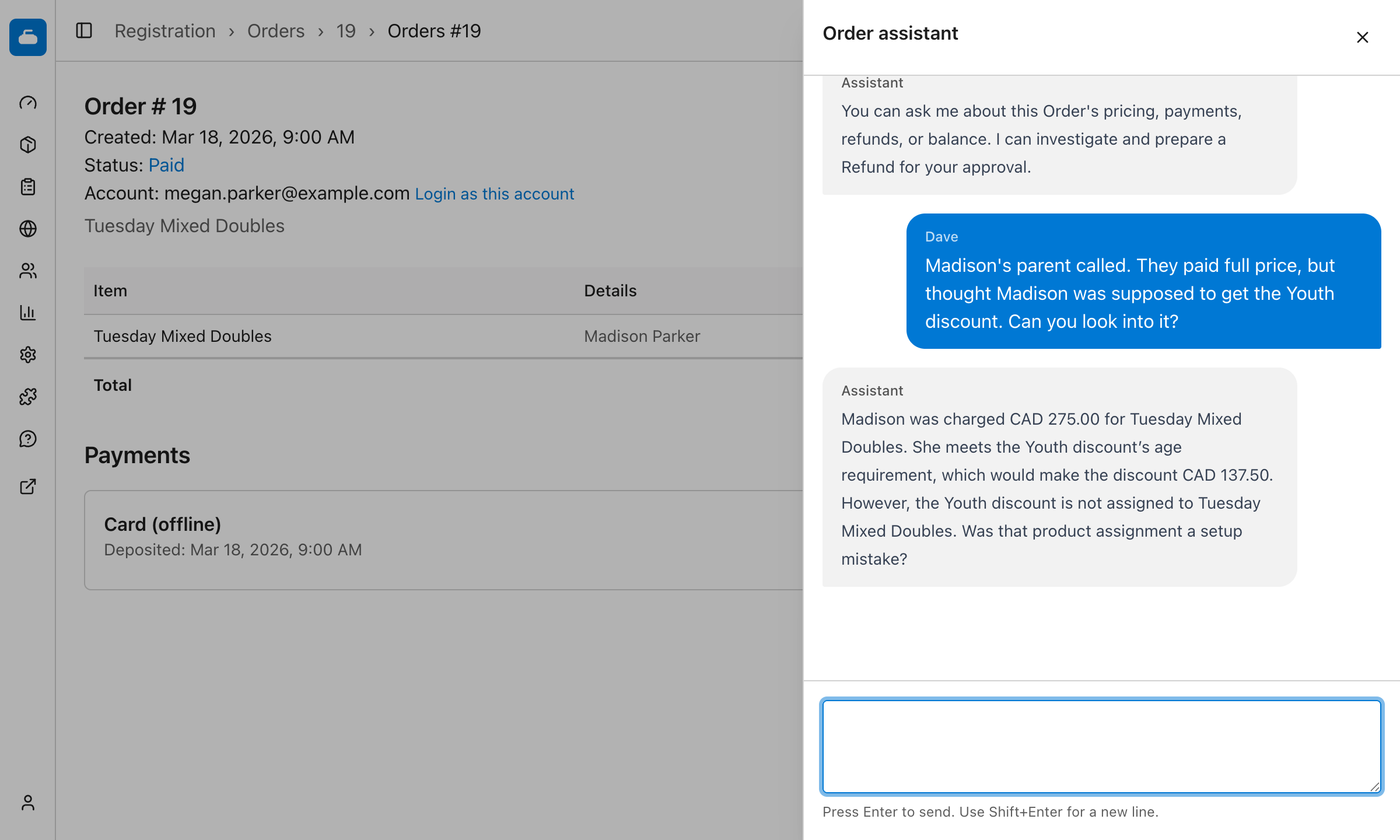
In this case, Madison meets the age requirement. The problem is that the Youth discount was not assigned to the league, so it was not considered when the order was priced.
That distinction matters. Checkout followed the club's configuration. The assistant has found a likely setup mistake, but it does not assume that the club intended the discount to apply. The club manager confirms that before anything is changed.
Preparing the correction
After the manager confirms that the league should offer the Youth discount, the assistant calculates the adjustment using the same pricing rules as checkout. It prepares a reduction to the order and the corresponding refund against the original payment. For Madison's $275 registration, the proposed refund is $137.50.
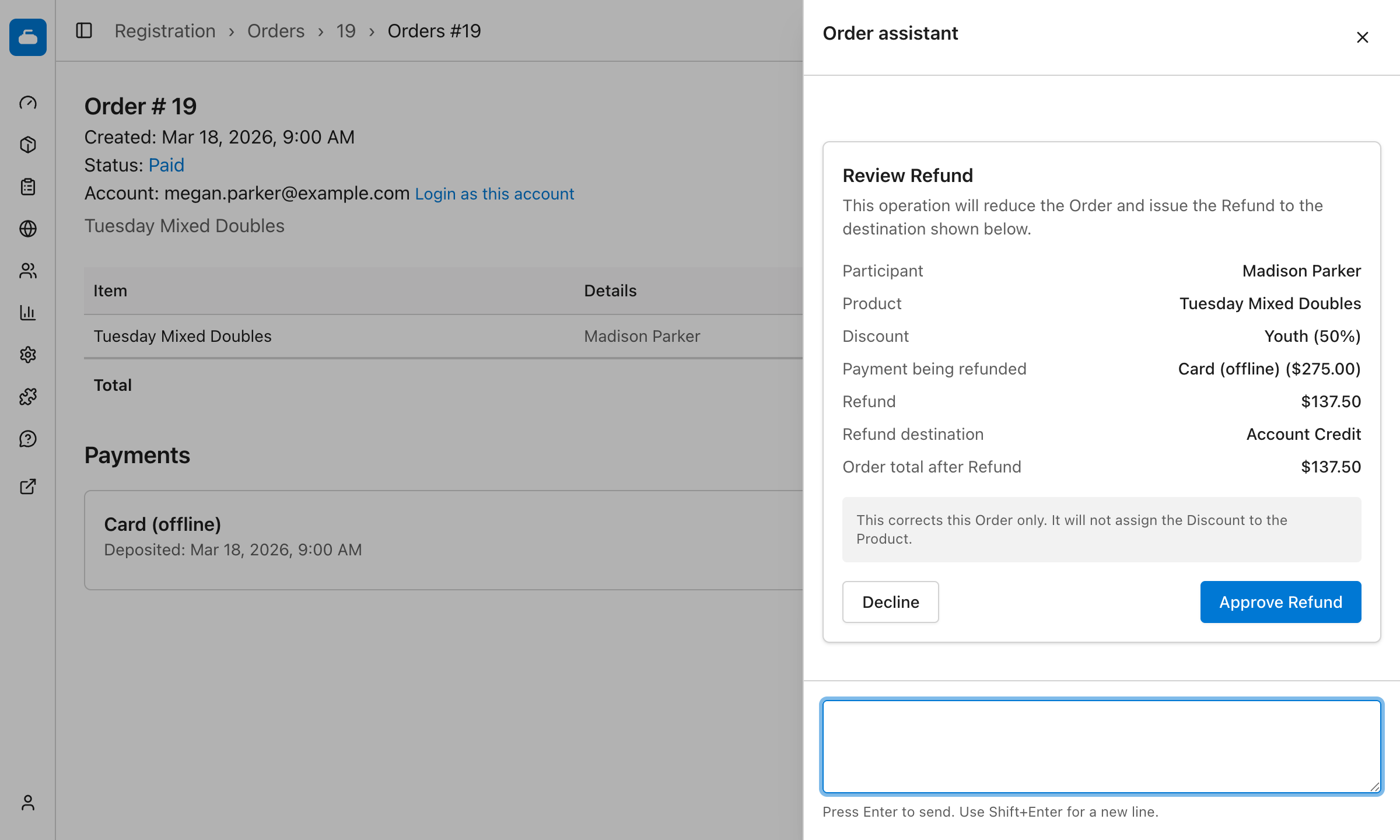
The manager can review the calculation, the payment being refunded, where the refund will go, and the resulting order balance. Nothing changes until the manager approves the operation. If the refund should go to account credit instead, the manager can decline the proposal and ask for that change.
The approval corrects this order. It does not change the league's configuration. The assistant explains that the manager still needs to open the product and assign the Youth discount so future registrations receive it.
After approval, the order shows the $137.50 reduction and the refund against the original payment.
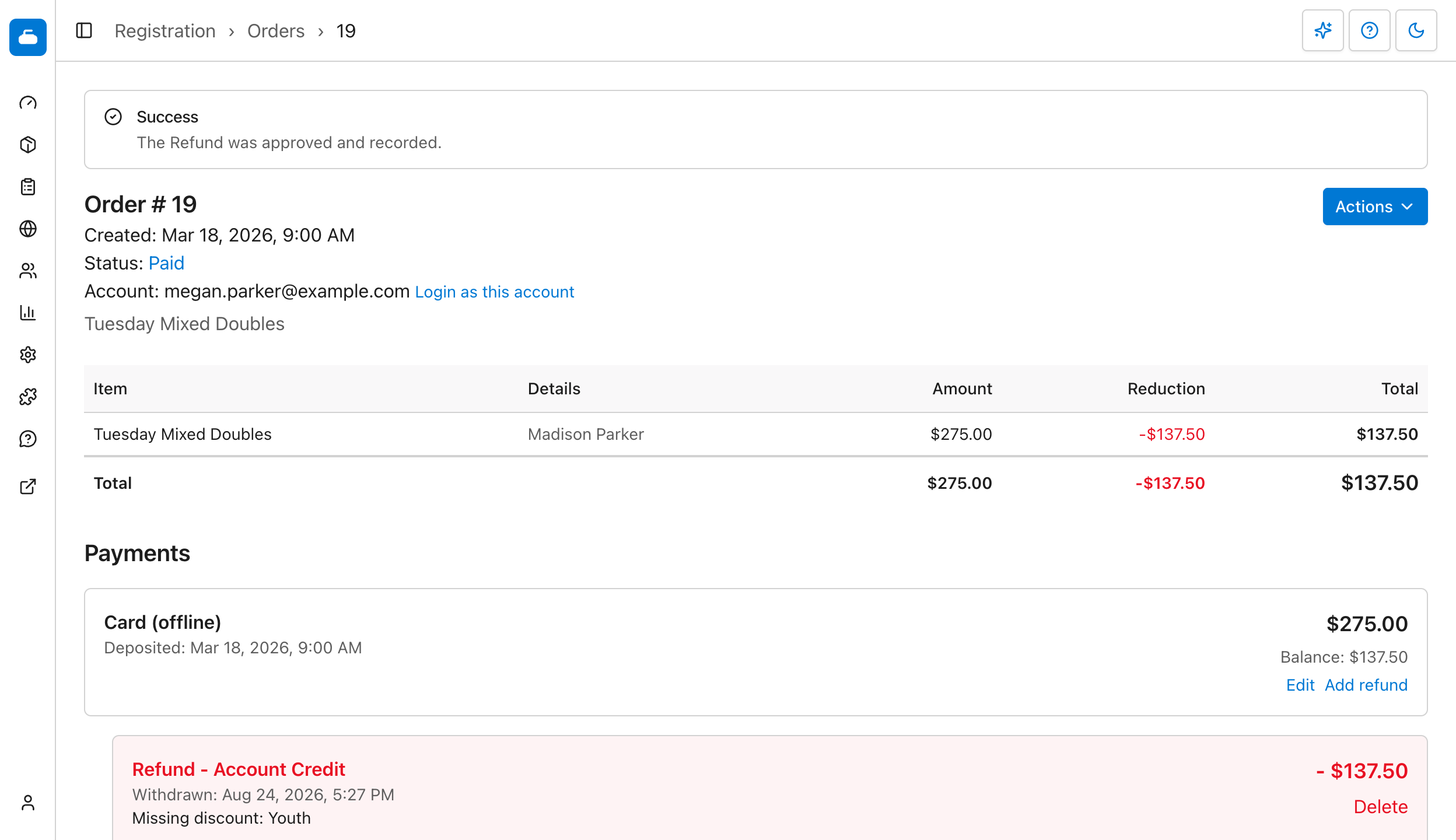
That is an intentional boundary. The order assistant can investigate and correct that order. It cannot cross into editing a product just because the investigation found a product configuration problem.
We may eventually allow an explicit handoff from the order assistant to the assistant responsible for products. For now, each assistant stays within a tight, task-specific sandbox.
Preparing an email broadcast
We set up this premise in a demo club, then worked through it using the in-app assistant. The responses shown below were not scripted.
A club manager can also ask the assistant to prepare an email for a particular audience. The assistant prepares the audience filters and message, then presents the broadcast for review.
For example, a manager can ask:
Please prepare a short reminder for everyone registered in Tuesday Mixed Doubles this season. Let them know the first draw is Tuesday, October 7 at 7:00 PM and ask them to arrive 15 minutes early.
The assistant tests the requested filters separately from the broadcast form, finds four matching recipients, and prepares the subject and message. It then presents the complete draft for review. The manager's form has not changed yet.
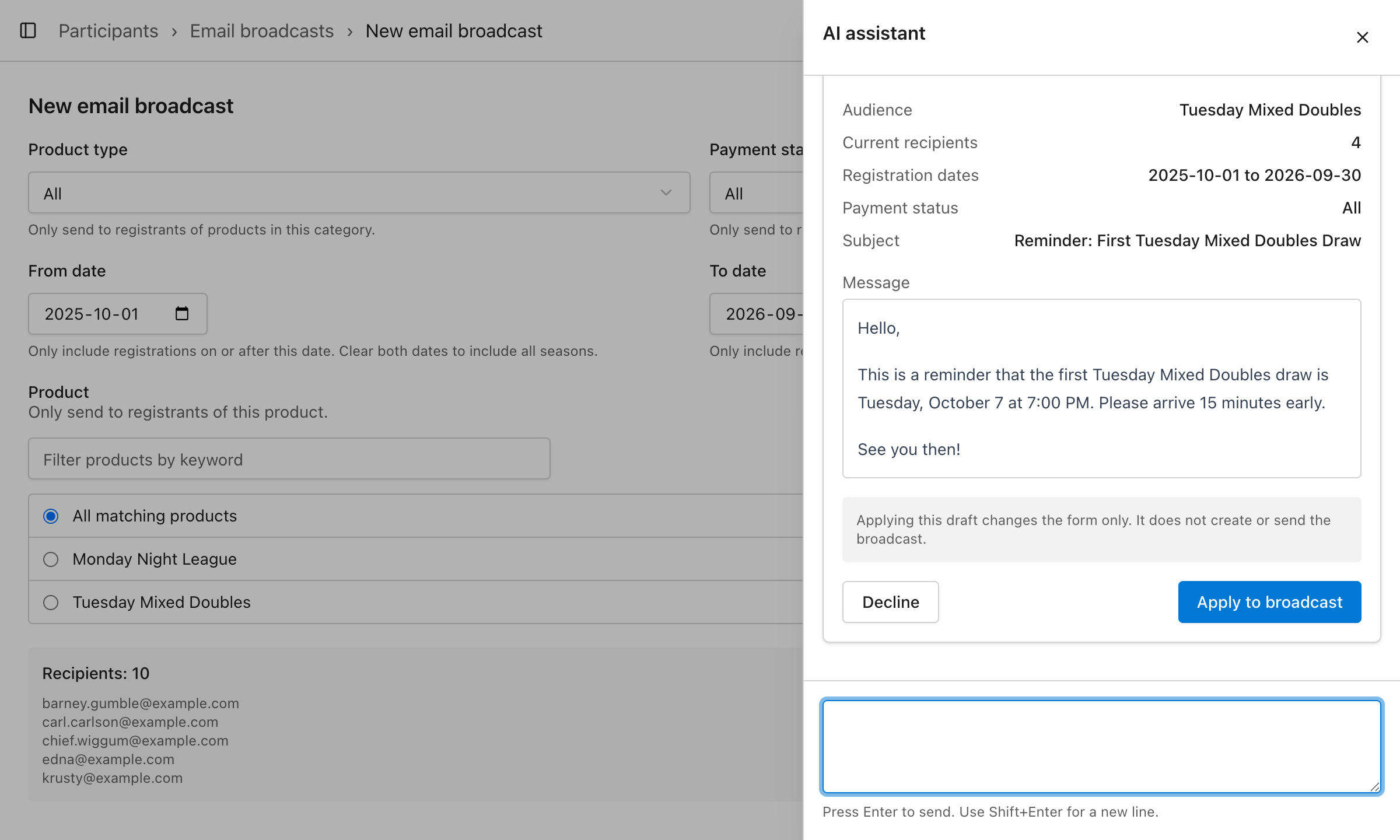
If the manager chooses Apply to broadcast, Curling IO copies those exact filters and message into the editable form. The manager can change them further, inspect the resulting recipients, and use the normal send confirmation when ready. This step does not create or send the broadcast.
Limited to the current task
Each assistant is optional and inactive until someone uses it. When a manager asks for help, Curling IO gathers only the information relevant to completing that task and provides it to the model in a limited, structured form.
The order example does not require unrestricted access to the club. It needs the order, the participant and purchase information relevant to its pricing, and the nearby discount configuration needed to answer the question. Unrelated orders and unrelated member information are left out.
Curling IO also decides which task-specific tools are available in each section. The order assistant may inspect pricing and propose an order correction. Editing a product is not available. The email broadcast assistant receives a different set of read-only tools for preparing and previewing an audience and message.
The model cannot call arbitrary application code or add tools to its own task. Most importantly, it is not given a tool that performs an approved operation.
Data processing
Curling IO requires the external model provider handling each assistant request to operate under a Zero Data Retention policy. This means the provider can process the information supplied for the request and return a response, but cannot retain the prompt or response afterward or use it to train models. Provider prompt logging is not enabled.
Approval is part of the operation
Preparing an operation and performing it are separate steps. The assistant can present a proposal, but it cannot approve or perform it.
Each operation has a contract that defines its required information, valid values, defaults, review presentation, and execution rules. If the assistant cannot fill every required field from the information available, and there is no valid default, it has to gather more information or ask the manager.
The proposal contains the exact action and every parameter that can affect the result. Curling IO stores that snapshot and uses the contract to render the review shown to the manager. The assistant does not decide which fields to show. For the refund, the review includes the participant, product, discount, payment being refunded, refund amount, refund destination, and resulting order total. For the broadcast, it includes the audience filters, current recipient count, subject, and full message.
Approval turns that frozen proposal into an execution contract. Approval is an authenticated request made by the administrator to Curling IO. It is not a prompt sent to the model. The model is not resumed after approval and never receives a function that can carry out the contract.
Curling IO loads the stored contract and executes it through application code. No model is running at this point, so its parameters cannot change between review and execution. The contract is single-use. A batch, another action, or any material change requires a new proposal and another approval.
Approval does not bypass the regular application. Curling IO checks the administrator's permissions, validates the current state, and applies the same business rules used by the ordinary interface. If the operation is no longer valid when it is approved, it is rejected instead of being performed from stale information.
If the manager chooses Decline, Curling IO records that decision and asks what they would like changed. Their next message continues the same conversation with the decline included as context. The declined proposal cannot later be approved.
Proposal creation, approval, decline, execution, and the resulting record are audited. Operations that can be retried also retain the proposal identity so an interrupted request cannot perform the same contract twice.
As we add assistants to more sections before Curling IO v3 launches, each will have its own task-specific information and contracts. The approval boundary will remain the same.