Send Curling IO Purchases to Zapier or n8n

This post is part of our Curling IO v3 sneak peek series, where we explore some of the new features available in the upcoming version.
Clubs often need to send purchase information to systems outside Curling IO. That might mean updating a spreadsheet, notifying staff, or starting a workflow in another service.
Rentals are one example. Someone may need to prepare the lounge, reserve tables, arrange catering, or add the booking to a staff spreadsheet.
Curling IO v3 webhooks can send that product purchase to Zapier, n8n, or another HTTPS endpoint when it is submitted, paid, cancelled, or rescheduled.
Choose the products to watch
One webhook sends one kind of notification to one destination. A club can send:
- every product;
- products matching selected product types, such as rentals;
- individual products, such as four specific corporate rental options.
The product filter has three scopes. If two receivers need different products, the administrator creates a separate webhook for each receiver and scope.
Rentals and their add-ons are products. The same webhook configuration also works for memberships, leagues, programs, and other products.
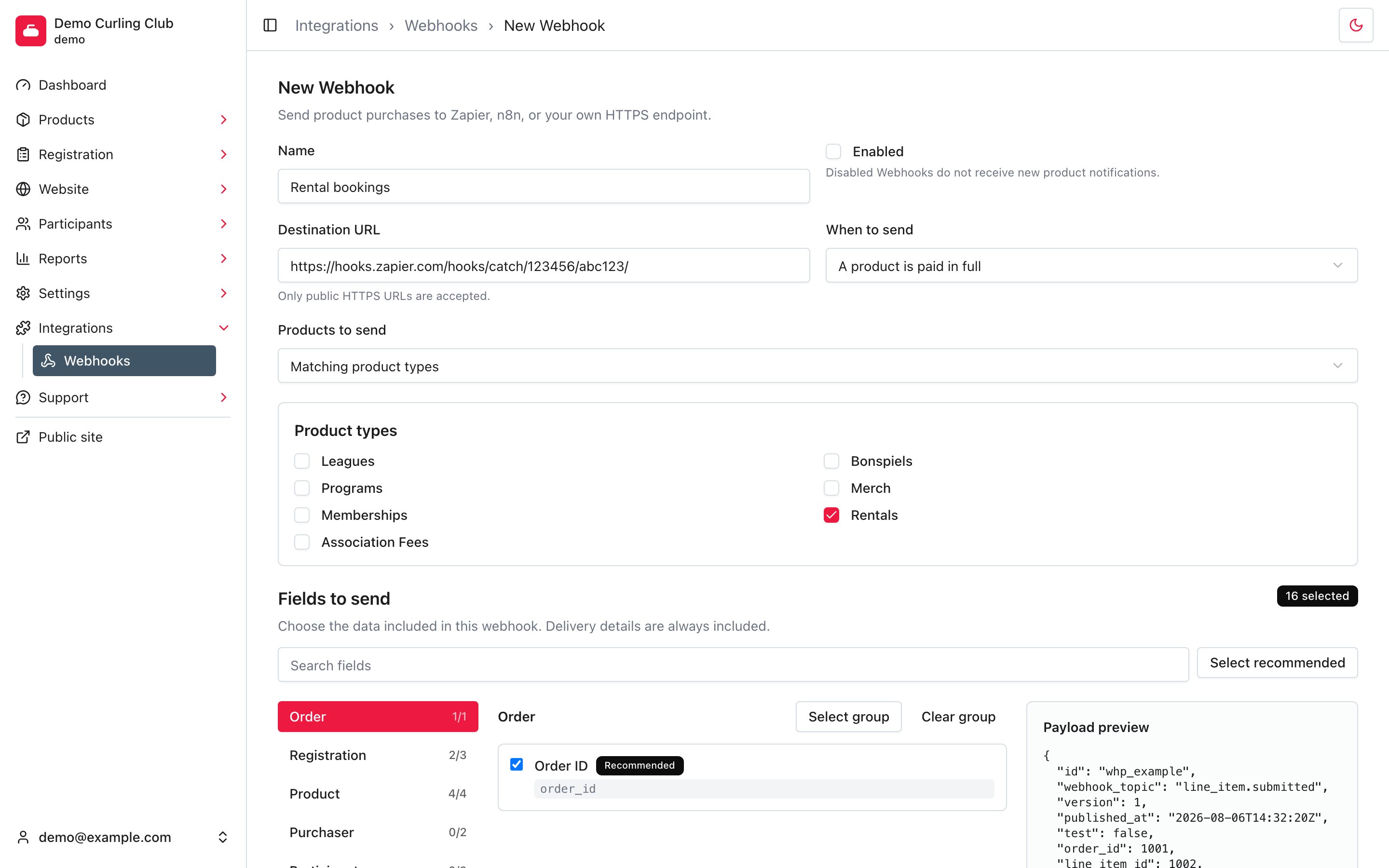
A webhook can send every product, selected product types, or individual products. This one sends paid rental purchases to Zapier.
Choose when to send
A webhook sends for one trigger:
- A product is submitted after checkout finishes.
- A product is paid in full the first time its line item is fully paid.
- A product is cancelled when a refund allocation cancels the line item. Reducing its quantity or value does not send this notification.
- A product is rescheduled when an administrator changes the purchased product's start time in the calendar.
A workflow that needs more than one trigger can use separate webhooks at the same destination.
Choose what the receiver gets
The club chooses which purchase fields each webhook sends. New webhooks start with 16 recommended fields covering the order, registration, product, pricing, and schedule. Purchaser and participant information is not selected by default.
Fields are grouped and searchable. An administrator can select a whole group, clear it, or return to the recommended selection. The payload preview updates immediately, so the club can see the JSON keys and representative values before saving or sending a test.
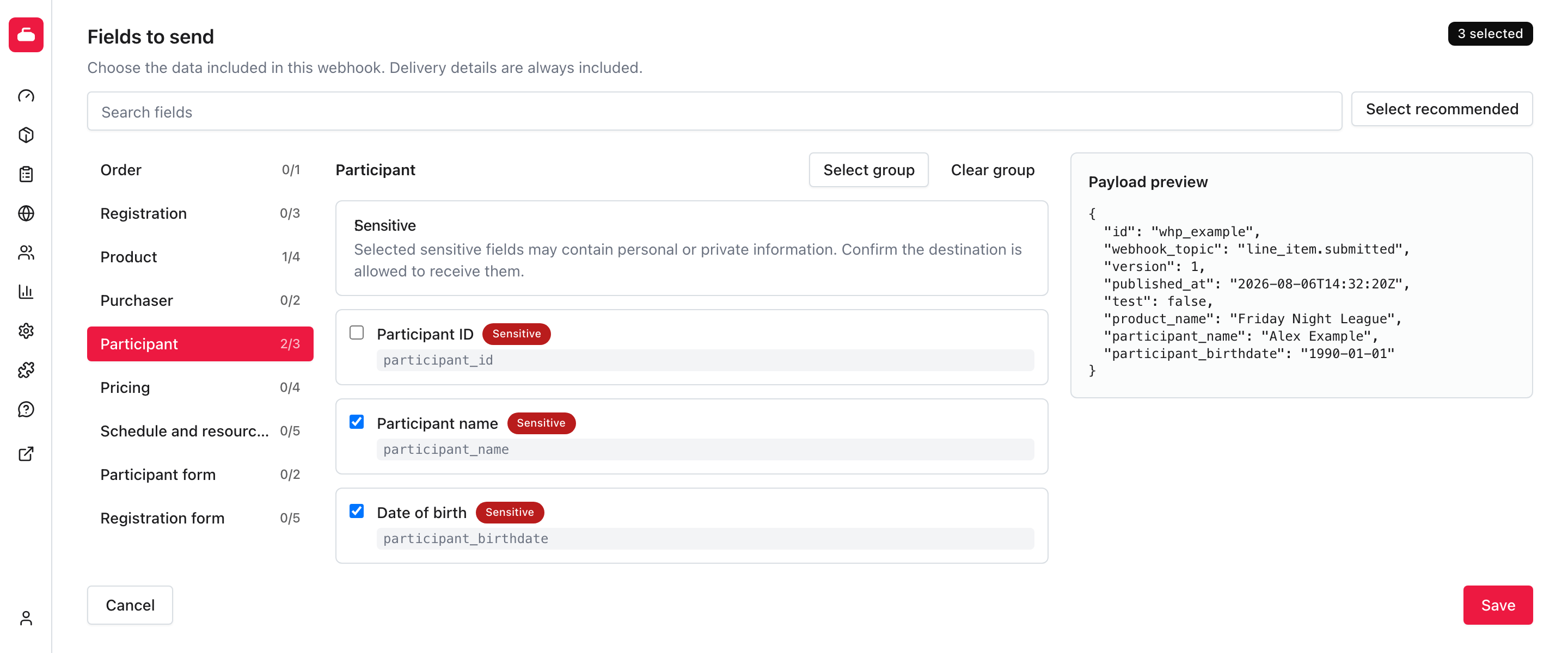
This example uses a small field selection so the complete payload is visible. Delivery details remain in every payload, while the other keys follow the saved selection.
Purchaser and participant fields are marked Sensitive. Custom participant and registration questions are marked May be sensitive because the answer depends on the question. Curling IO warns the administrator but lets the club decide whether the destination should receive that information. Passwords, authentication tokens, payment card data, and payment-provider secrets cannot be selected.
Curling IO accepts only public HTTPS destination URLs, which encrypts the request in transit. Curling IO has no control over how Zapier, n8n, or another receiving service handles the data after delivery and is not responsible for that third-party handling. The club is responsible for choosing the service and deciding which fields to send to it.
Test the receiver before enabling the webhook
The administrator can leave a webhook disabled and select Send test. The test uses the saved field selection and the real delivery path. It contains a representative rental, so Zapier or n8n can discover the selected JSON fields before the webhook is enabled.
In Zapier, use a Webhooks by Zapier > Catch Hook trigger. In n8n, use a Webhook node. Copy the receiver's HTTPS URL into Curling IO, send the test, and map the fields before enabling the automation.
Delivery reliability
Webhook calls run in the background. Curling IO retries network failures, timeouts, rate limits, and server errors up to five times. The receiver can use the stable webhook publication ID to discard a duplicate if a request succeeds but its response is lost.
Each request is signed with HMAC-SHA256 for receivers that can verify it. A Zapier Catch Hook normally relies on its hard-to-guess URL instead, so that URL needs to be treated like a password.
Administrators can inspect Recent Deliveries, see attempts and HTTP statuses, retry a failed retained delivery, rotate the signing secret, or disable the webhook. Detailed payload and delivery data are removed after 30 days. Each delivery stores its exact request body, and every retry sends that same body even if the field selection or purchase data changes later.
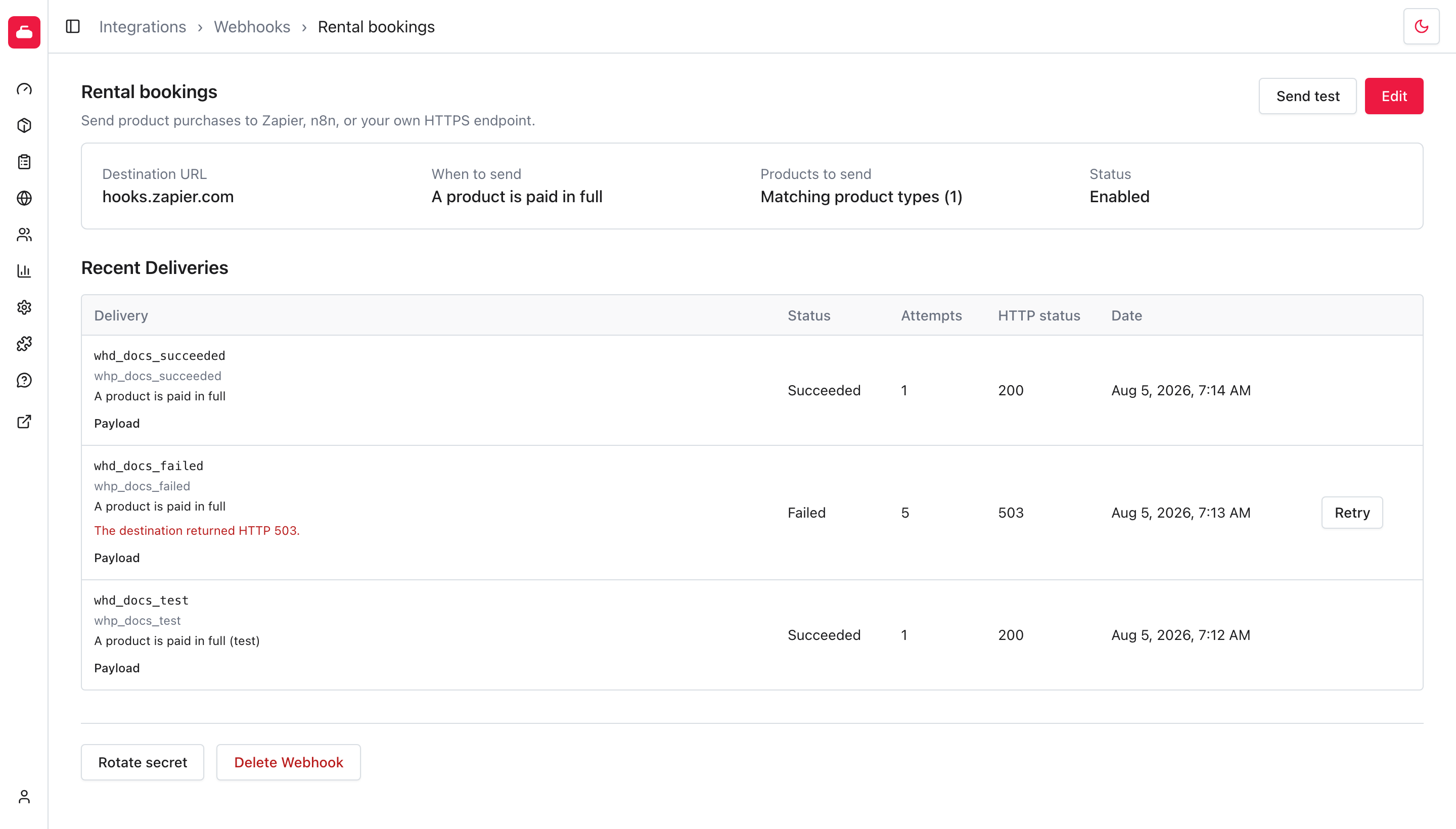
Recent deliveries show successful requests, failed attempts, HTTP statuses, and when a failed delivery can be retried.
See the webhook setup guide for the payload, Zapier and n8n steps, retry rules, and signature verification.