Let people try curling without committing their winter
Give new curlers a way to sign up for a few weeks. Someone who enjoyed a first visit may be ready to come back next Thursday without knowing whether they can commit through March.
The third podcast episode in Curling Canada's The Future of Canadian Curling series discusses shorter commitments for new curlers. A four-week learn-to-curl program gives beginners time to learn the basics and play a few games before deciding whether to join a longer league.
Make the offer easy to understand
Choose a time you can offer consistently and confirm that you have enough instructors, equipment and ice for the group. Leave room for an introduction to safe play at the first session and help throughout the program. Follow your club's and association's guidance on equipment and safety.
Decide whether registration includes a club membership or a fee for this program only. Confirm the club's membership requirements and check with your association which fees and insurance arrangements apply before setting the price. A short program needs a clear total cost.
For this worked example, we'll use a learn-to-curl block with these details:
- Four consecutive Thursdays, from 7 to 8:30 p.m.
- 32 places across four sheets, with individual registration and no team required.
- $120 per person for the block, with instruction and equipment included.
The timing, capacity and price are examples. Choose your own based on what your club can provide, including any applicable taxes and required fees. Add arrival instructions, what to wear, who will greet the group and what happens if someone misses a week.
Set up the four-week block in Curling IO
Go to Products > Programs > New product.
- Enter a Name, such as "Four-week Beginner Curling", and a short Summary. Put all four session dates, the times and what registration includes in Description. Keep Enabled checked.
- Turn on Dates. Set Starts to the first Thursday at 7 p.m. and Ends to the fourth Thursday at 8:30 p.m. Set Opens to when you want registration to begin and Closes to your registration deadline, allowing time to prepare for the first session. Fill in both registration dates; leaving either blank makes registration unavailable.
- Turn on Inventory and enter 32. This allows eight people per sheet on four sheets.
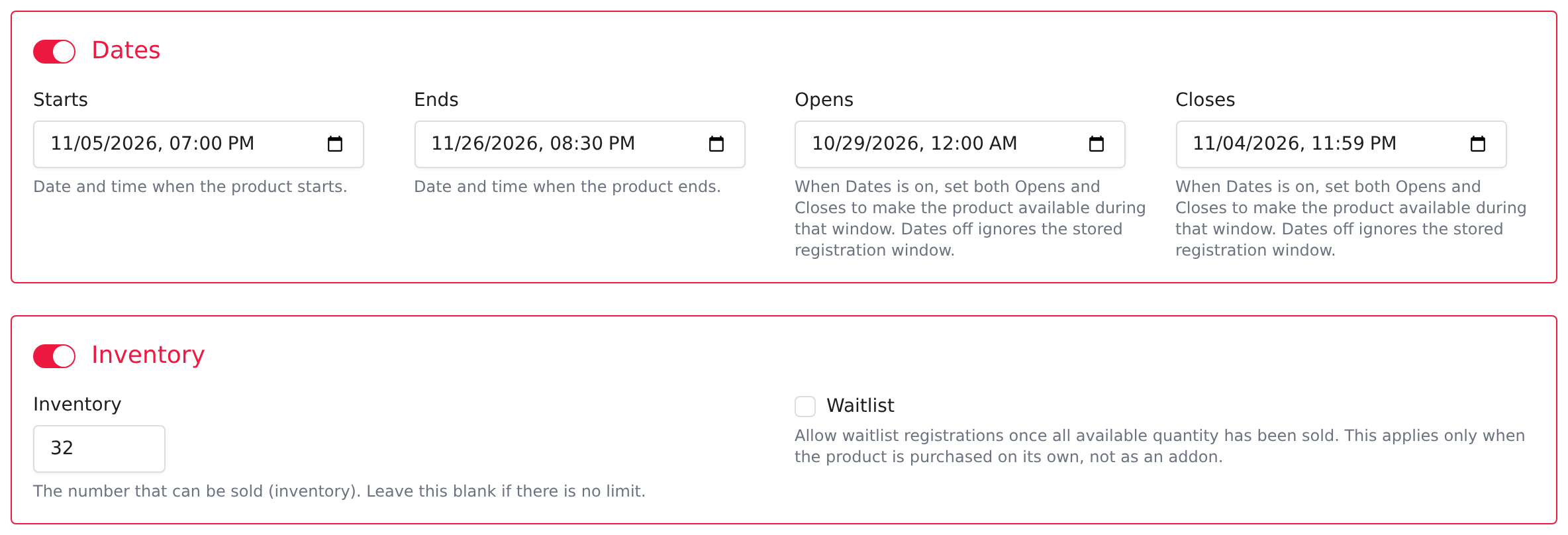
Starts and Ends describe the whole block. They don't create four ice bookings, so reserve the ice with your club and list each session in the description.
- Turn on Availability and set List as to Standalone only.
- Turn on Participant so each registration identifies the person who will curl. Turn on Pricing, enter 120.00 in Price, and select any taxes that apply to your program.
- Make sure the other optional sections are off, including Event Settings if your Programs type shows it, then select Save.
If registration must include a club membership or another required charge, turn on Addons and configure the required addon. Check the separate association fee setup for fees your association requires. Include those costs in your advertised offer.
Let people arrive without a team
If you require beginners to find three other people before registering, you've given them another job before they've started.
Use an optional question to let people name a friend they'd like to play with:
- Open the product's Form builder and select New question.
- Enter "Playing with a friend?" as the Name, choose Text as the Type, and add a Hint, such as "Enter their name. You are welcome to register on your own."
- Select Save in the question window. Curling IO adds the question to the form. Leave its badge set to Optional, drag it into place, then select the form's Save.
If you've already created the question, type part of its name in Filter questions, then drag it from the panel onto the form. You can place it between existing questions, as shown here.
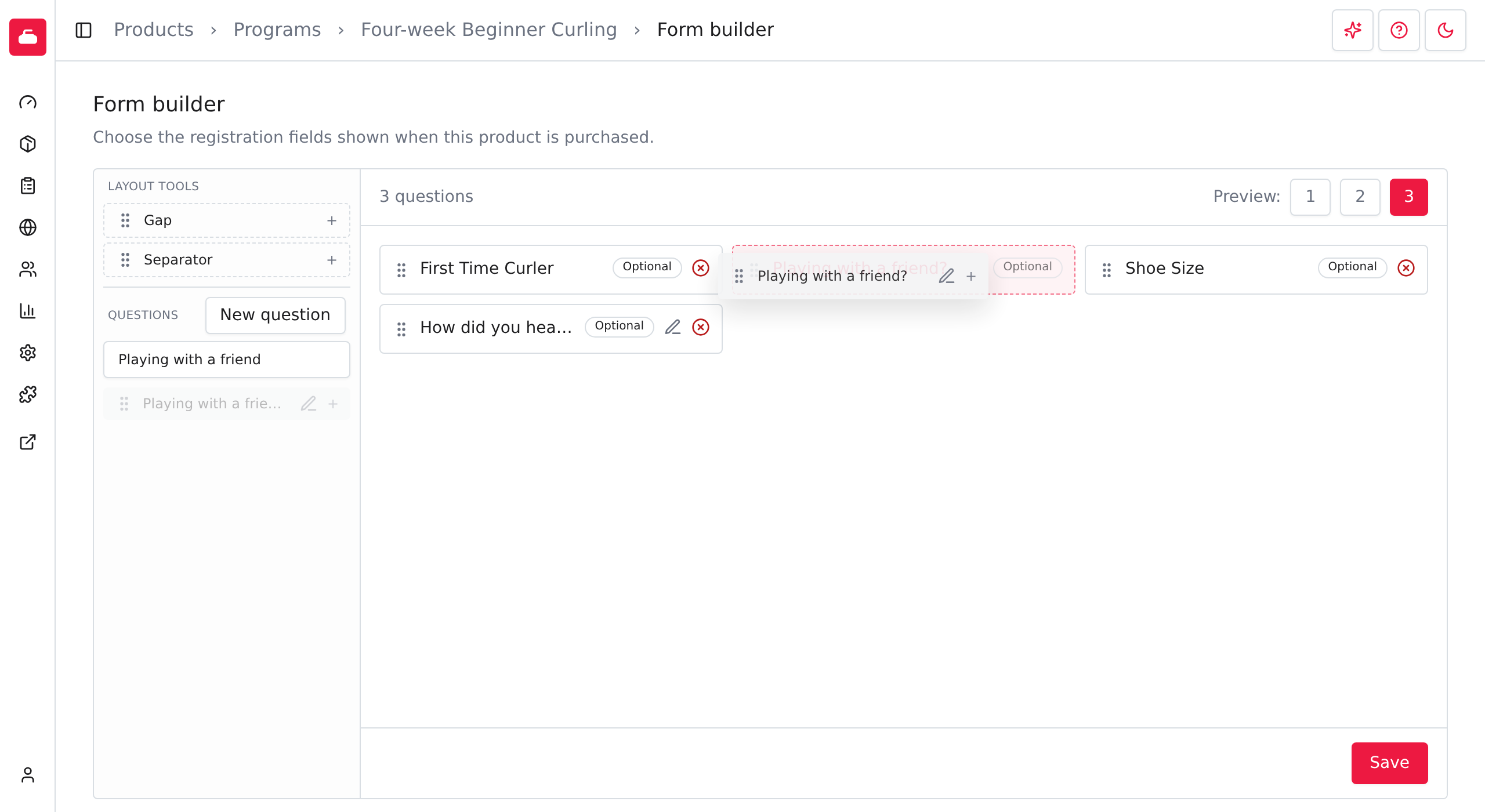
The question records a preference. The organizer still arranges the groups. Read an answer by opening Registrations and selecting the pencil action for that registration. To see the answers together, use the Line items report and add the question through Customize columns.
Keep the rest of the form short. Ask for what you need to run the program, meet your club's requirements and contact the participant. The form builder guide covers the other question and layout options.
Check the offer before sharing it
After saving the product, select Preview on its Info page. Check the dates, price and description as a beginner would see them. Until the Opens time, the page shows Not open yet instead of Add to cart.
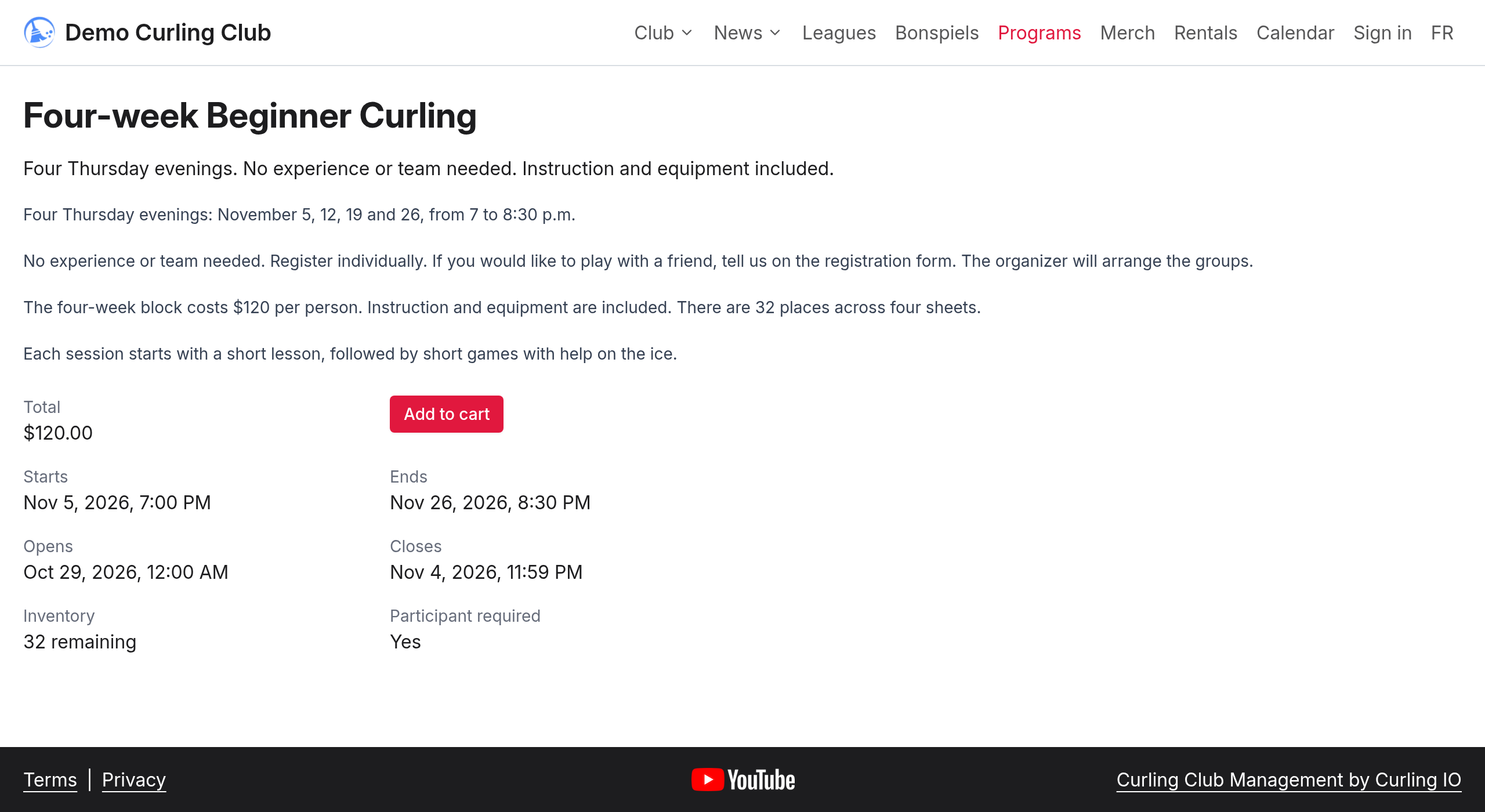
Show the page to someone who has never curled. Ask what they'd still need to know before registering, then add those answers before you share the link.
Run the four-week program
Allow time for questions and instruction, with short games that fit the advertised finish time. For example, begin with a short group lesson, then play short games while the instructor moves between sheets to help.
Name the person who will greet the group. Tell them where registrations are recorded, who has asked for help and what equipment has been promised. Confirm who can cover if that person is away.
Before the last session, choose a next opportunity that welcomes beginners, such as another short block or a social event. Give people the dates, cost and a way to sign up while they're still coming to the club. Ask whether the timing works for them.
Ask the assistant to help with setup
Curling IO's AI Assistant can fill in the program settings for you. Open Products > Programs > New product, then select the sparkle button, Ask AI for help with this task. Give it your session dates, registration window, capacity and price. Requests use Platform Credits.
Start with a request like this:
Help me create a program called "Four-week Beginner Curling" for 32 people across four sheets. Run it on four consecutive Thursdays starting next Thursday, from 7 to 8:30 p.m. Charge $120 per person, with instruction and equipment included. People register individually, with no experience or team required. Open registration today and close it at 11:59 p.m. the day before the first session. Include all four session dates in the description. Ask me about anything else you need, then show me the setup for approval.
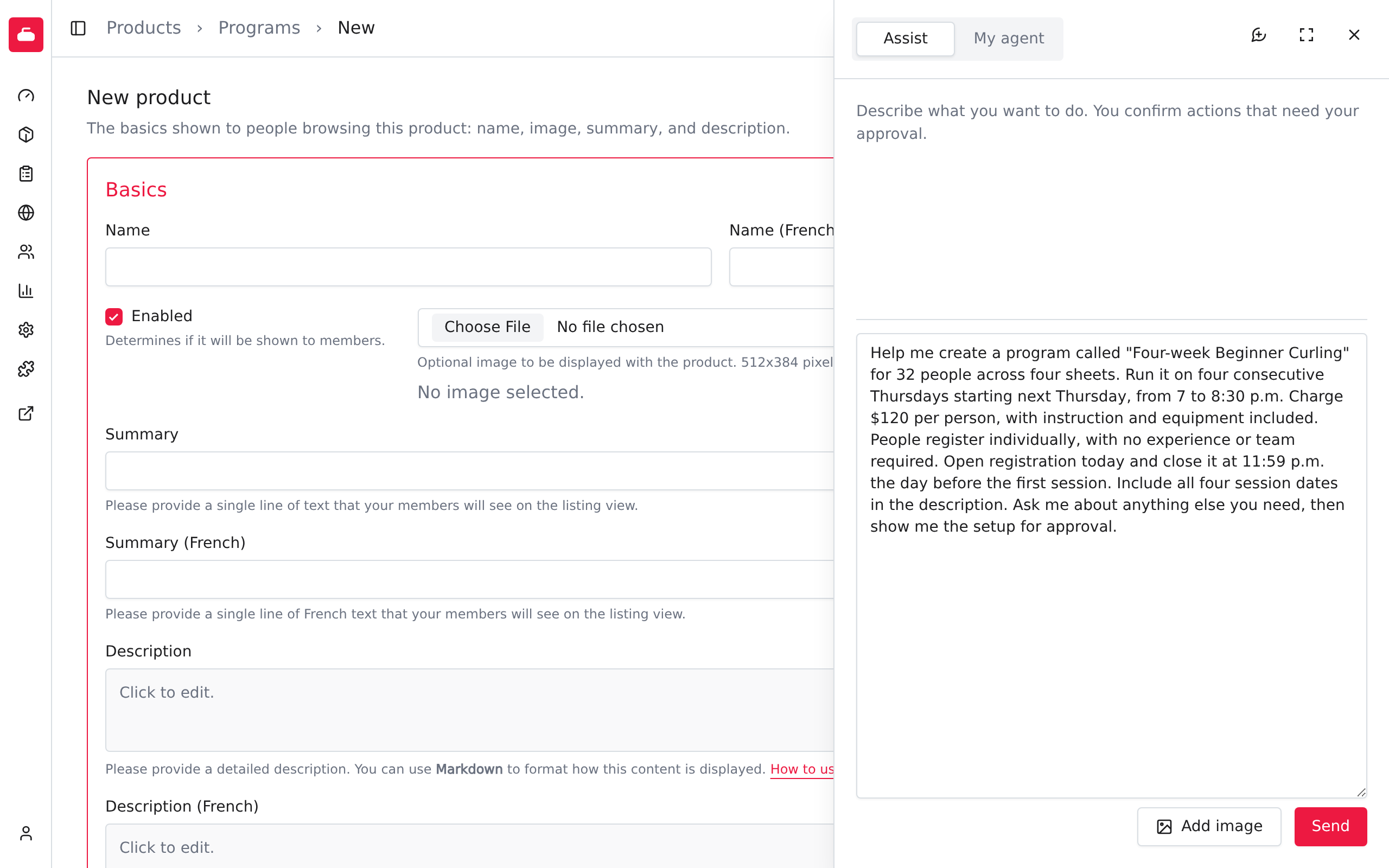
The assistant may ask follow-up questions as you work through the setup. It presents the settings for your review before saving them. Check that they match your request, then select Approve or Decline.
After saving, open the program's Form builder and ask it to add the optional friend question. Creating the question and saving the form layout each have their own approval.