Managed Waiver Templates for Membership Associations

This post is part of our Curling IO v3 sneak peek series, where we explore some of the new features available in the upcoming version.
Membership associations sometimes need more than a recommended waiver. A group insurance policy may require every member club to present the same approved language to its Participants.
Emailing a Word document to each club distributes the wording, but it does not keep that wording under control. A club can edit its copy, miss the next update, or keep collecting responses against an old version. Later, the association may have no reliable way to tell which document a Participant actually saw.
Curling IO v3 will connect those pieces. A membership association can publish one locked waiver, make it available to its member clubs, update it in one place, and report on which clubs have Participants responding to it.
See the Managed Waiver Workflow
This tutorial shows the complete workflow: creating managed and customizable waiver templates, publishing a new version, enabling association waivers at a member club, and reviewing version and response records.
From Group Insurance Policy to Participant Response
Suppose Demo Curling Association’s group insurance policy requires every adult Participant to accept an approved General Liability Waiver. Here is how that would work in Curling IO v3.
1. The association publishes a managed waiver template
A managed waiver template is an association-controlled waiver that member clubs can use but cannot edit. The association creates it once and controls the waiver name, body, acceptance text, and inclusive age range. Setting a minimum age of 18 means the waiver includes Participants who are 18 and older.
The waiver can contain variables for the member club’s name, province, and membership association. Curling IO fills those values in for each club, so the association does not need to maintain separate copies of otherwise identical documents.
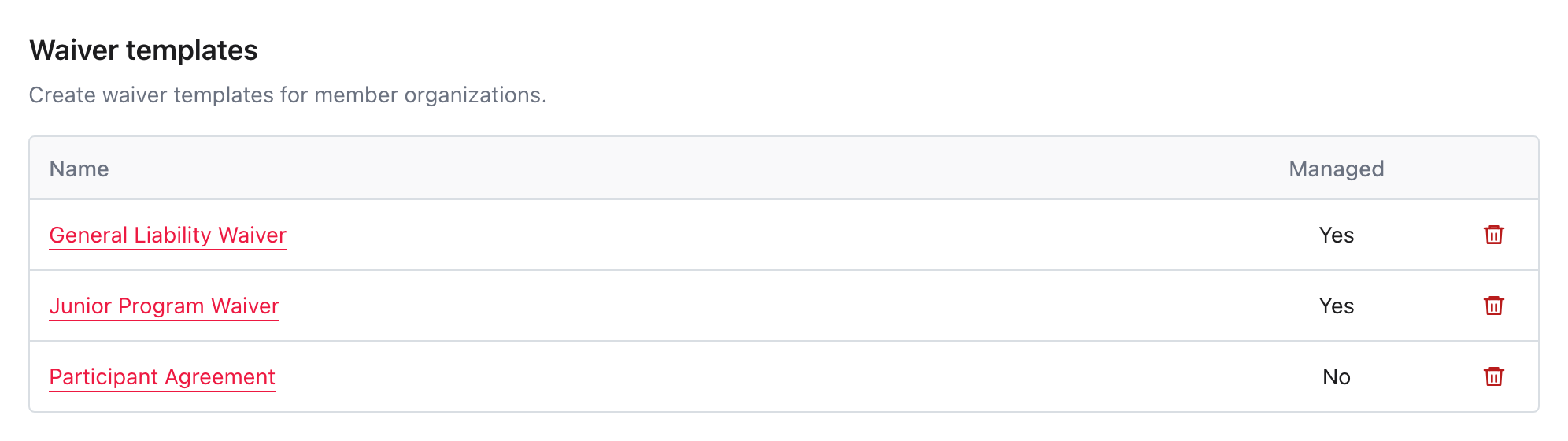
2. Member clubs enable the association waiver
New member clubs begin with available managed waivers enabled. When an association adds a managed waiver later, existing clubs see it in their Association waivers list as disabled. They can review it and enable it when they are ready to begin collecting responses.
Once enabled, the club cannot change the association-controlled document or age range. It can disable the waiver, but it cannot quietly edit the wording while continuing to present it as the association’s waiver.
3. Participants respond during registration
When the waiver applies to a Participant, Curling IO presents the current association-controlled document during registration. The account holder accepts it for themselves or, when required, responds as the Participant’s legal guardian.
The saved response records the managed template, its version, and the exact resolved document shown at the time. It also records the Participant’s age, who responded, and the guardian relationship when one applies.
4. The association can see which clubs are using it
Membership association reporting will show which member clubs have Participant responses tied to each managed waiver. This is more useful than checking whether a waiver is enabled. A club can have a waiver enabled without registering anyone, while a saved response proves that the managed document was presented and answered.
The report provides evidence that clubs are collecting responses against the association-managed waiver. It does not make an automatic legal ruling that a club has satisfied every condition of an insurance policy. Those policies may include requirements Curling IO cannot infer.
Update Every Club Without Replacing History
When approved wording or age requirements change, the association publishes a new managed template version. The new version immediately becomes the document shown by every member club using that waiver.
People who have not responded will see the latest version. Participants who already responded during the season will not be asked again just because the association published an update.
The earlier version and its responses are not overwritten. Member clubs can review the version history and compare what changed, but they cannot roll a managed waiver back or apply their own version. Each historical response still shows the exact waiver document presented to that Participant.
Use a Customizable Template When Locking Is Not Required
Central control is not always necessary. An association may have useful base language that clubs can adapt to local programs, facilities, or legal advice. In that case, it can publish a customizable waiver template instead. The practical differences are:
| Managed template | Customizable template | |
|---|---|---|
| Wording controlled by | Membership association | Member club |
| Later association updates | Roll out to every club using it | Do not change saved club waivers |
| Responses tied to the association template | Yes | No |
| Best fit | Group insurance or association policy requiring consistent wording | Optional base language clubs may adapt |
Selecting a customizable template prefills a new waiver form. The club can change the content before saving, and the resulting waiver belongs to the club. This is convenient, but convenience and compliance are not the same thing. If an insurer requires every club to use unchanged wording, the managed template is the option designed to preserve that control.
More Than a Waiver Upload and Checkbox
A basic waiver field can display text and collect an agreement. It does not give a membership association control over that document across independent clubs, preserve every version, or connect each response back to its managed source.
That connection is the important part of the v3 design. The association can publish the requirement. Clubs can put it into use without copying it. Participants respond to the current document. The resulting records show which version was presented and where it was used.
This is the latest post in our series about product features coming to Curling IO v3. We’ll keep showing the real workflows as they take shape, including what changes for membership associations, member clubs, and the people registering.