Curling Development Fee Claims
The Curling Development Fee claims report lists payments that curlers say they made outside Curling IO, so that you aren't charging them again. A report a curler makes counts right away and doesn't need your approval. Use this page to see what has been reported, record a payment you have checked yourself, or reject a report that shouldn't count.
Membership associations and the member clubs that accept payment reports both use this report. Clubs see only the claims made through their own organization. An association sees claims made through itself and through its member clubs.
Open the report
Go to Reports > Registration > Curling Development Fee claims.
The report appears when your organization accepts reports. For an association, that means Accept user claims for a Curling Development Fee paid elsewhere through the fee page is checked under Products > Association Fees. A club needs the same setting, and its association must also allow it with Allow member clubs to accept user claims for Curling Development Fees. See association fees for membership associations for those settings.
The report stays in the menu after you turn reporting off if any claim exists in your organization’s report, including a claim recorded by an organization. Existing claims remain in your history.
Read the report
Each row shows:
- Organization: the organization that accepted the report.
- Participant: the curler the fee was paid for.
- Product: the fee.
- Payment details: the season, the club where it was paid, the order or receipt number, the payment date if one was given, and the status. The status is Unverified for a curler's report, Verified for a payment an organization recorded, or Rejected.
- Source: User for a report a curler made, or Organization for a payment an organization recorded or imported.
If the curler later pays through Curling IO, the row shows the matching order.
Use Search to filter the list. Select Download to get a CSV of every claim that matches your search, across all pages. The file includes rejected claims.
You need permission to view financial reports to open this report.
Record a payment you have verified
Use this when you have confirmed a payment yourself, such as a curler who paid at another club and sent you the receipt. You need permission to manage order finances.
- Select Record fees.
- Enter the participant's name or email and select Search.
- Select the matching participant. Search shows up to 25 matches; enter a more specific name or email if you can't find the person.
- Choose the Product that was paid.
- Enter the Name of the club where the fees were paid and the Order or receipt number.
- Optionally enter a Payment date and a Review note.
- Select Record fees.
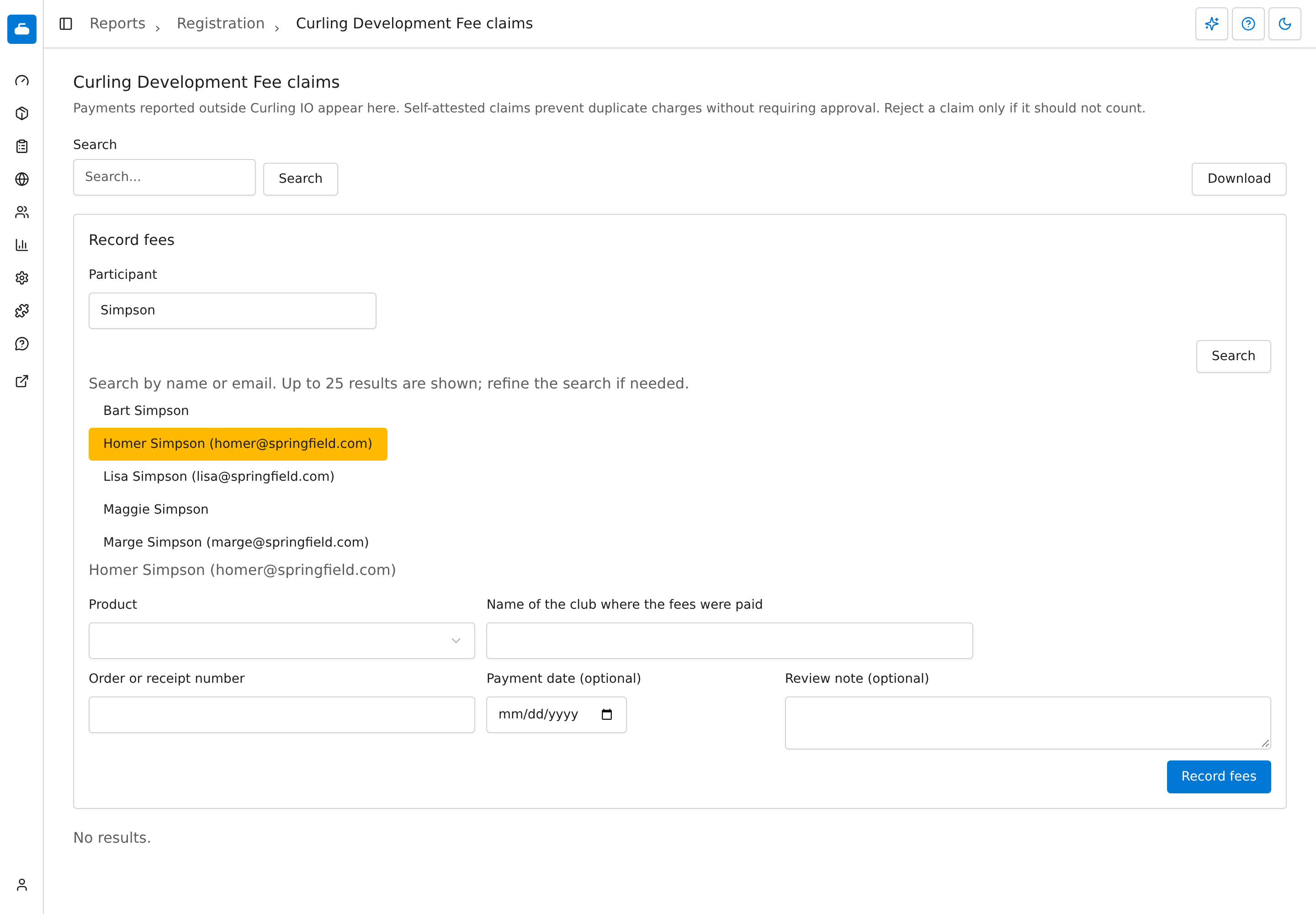
Name search and participant selection in the demo association.
The participant must be connected to your organization. For an association, that includes a participant connected to one of its member clubs. They don't need to have registered before. Only fees available to your organization can be chosen.
Recording a payment doesn't charge or refund anyone in Curling IO. It only tells Curling IO the fee has been paid, with a verified status.
Reject a report
Select Reject on a row. Curling IO warns you that the curler will be required to pay these fees again. Add a Review note (optional) if you want, then select Reject again to confirm. The row stays in your history as Rejected.
You need permission to manage order finances to reject a report.
Troubleshooting
The report is missing from the Reports menu
Check that reporting is turned on under Products > Association Fees. A club also needs its association to allow member clubs to accept reports.