Competition Requirements for Membership Associations
Walkthrough Video
You can require curlers to complete active waivers and pay seasonal affiliate fees when joining a competition. In this guide, joining refers to the separate curler-profile flow that happens after the team registration has been submitted. The team contact receives a join link on the registration thank-you page and in the email receipt. Administrators can also copy the same link from the competition's Profiles page. Each team member uses that link to attach their curler profile and complete their own requirements.
Curling IO checks each curler profile for two possible requirements: accepting waivers when you have waivers enabled, and paying seasonal affiliate fees when you require them for competitions. It only asks the curler to complete requirements that are still outstanding.
Before you enable affiliate fee collection
This setting is only available when you have your own qualifying affiliate fee. A qualifying fee must be:
- Active
- Inherited
- Set to Requires a curler profile
- Set to Seasonal per curler
When enabled, Curling IO checks your qualifying fees and those of your parent organizations. For example, you might have both provincial and national seasonal affiliate fees.
The setting applies to all competitions you run. It does not carry down to competitions run by your member clubs.
Curling IO automatically recognizes qualifying affiliate fees paid through any Curling IO club. Curlers who have already paid those fees will not be asked to pay them again. You can also choose to let curlers report affiliate fees they paid at a club that does not use Curling IO.
Turn on competition requirements
Go to Club > Settings > General and find Competition affiliate fees.
- Check Require affiliate fees for competitions to collect any missing qualifying fees when a curler joins a competition.
- If you want to accept payment reports from curlers, check Allow curlers to report affiliate fees paid elsewhere. This second option only appears while the first option is checked.
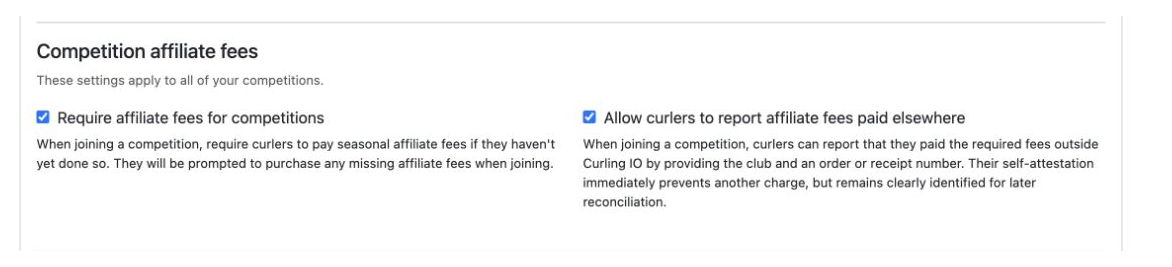
Payment claims reported by curlers remain in your records if you turn the second option off later. Disabling it only prevents new reports.
If you do not have affiliate fees, leave this setting off. Active waivers are still tracked on their own.
What curlers see
The event join page lists the curler profiles attached to the account. A profile shows Registered only after all applicable requirements have been completed. Otherwise, the curler selects Register.
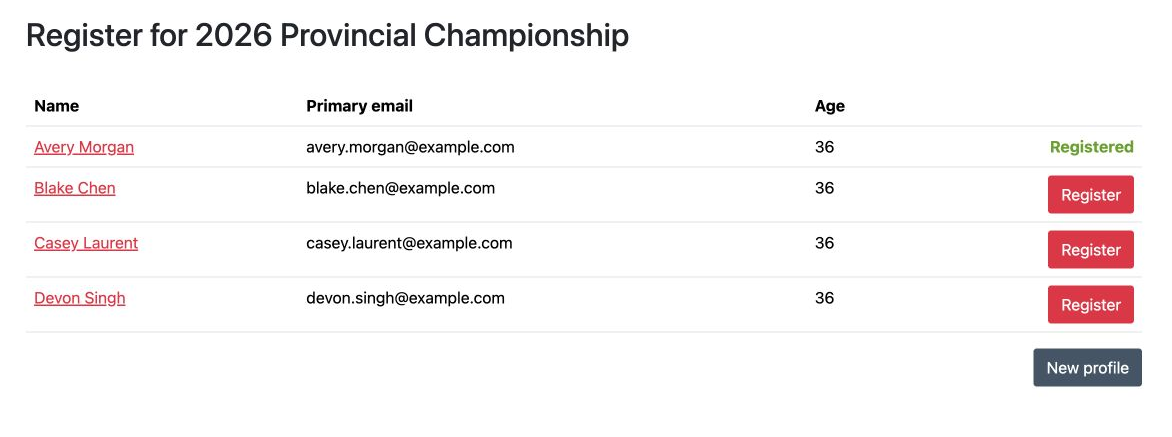
If the account does not have a curler profile yet, Curling IO opens the new profile form automatically. If the account already has profiles, the curler can select New profile to add another one without leaving the competition registration flow.
Accepting waivers
If a curler has outstanding waivers, Curling IO sends them to the waiver form before showing any unpaid affiliate fees. After the waivers are submitted:
- If all applicable affiliate fees are already paid, registration is complete.
- If affiliate fees are still outstanding, Curling IO shows the event requirements page.
Pay missing affiliate fees
When Require affiliate fees for competitions is enabled but Allow curlers to report affiliate fees paid elsewhere is not, the curler only sees the option to pay the missing affiliate fees.
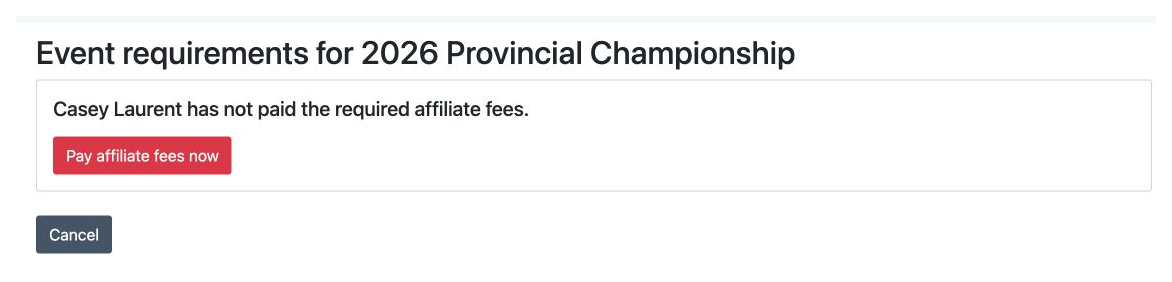
Selecting Pay affiliate fees now adds only the missing fees to the cart. These fees are wrapped in a special product called Affiliate fees, which is not displayed as an ordinary purchasable product anywhere else.
Report fees paid at another club
When the self-reporting option is enabled, a curler can either pay now or report that they already paid their fees at their club.
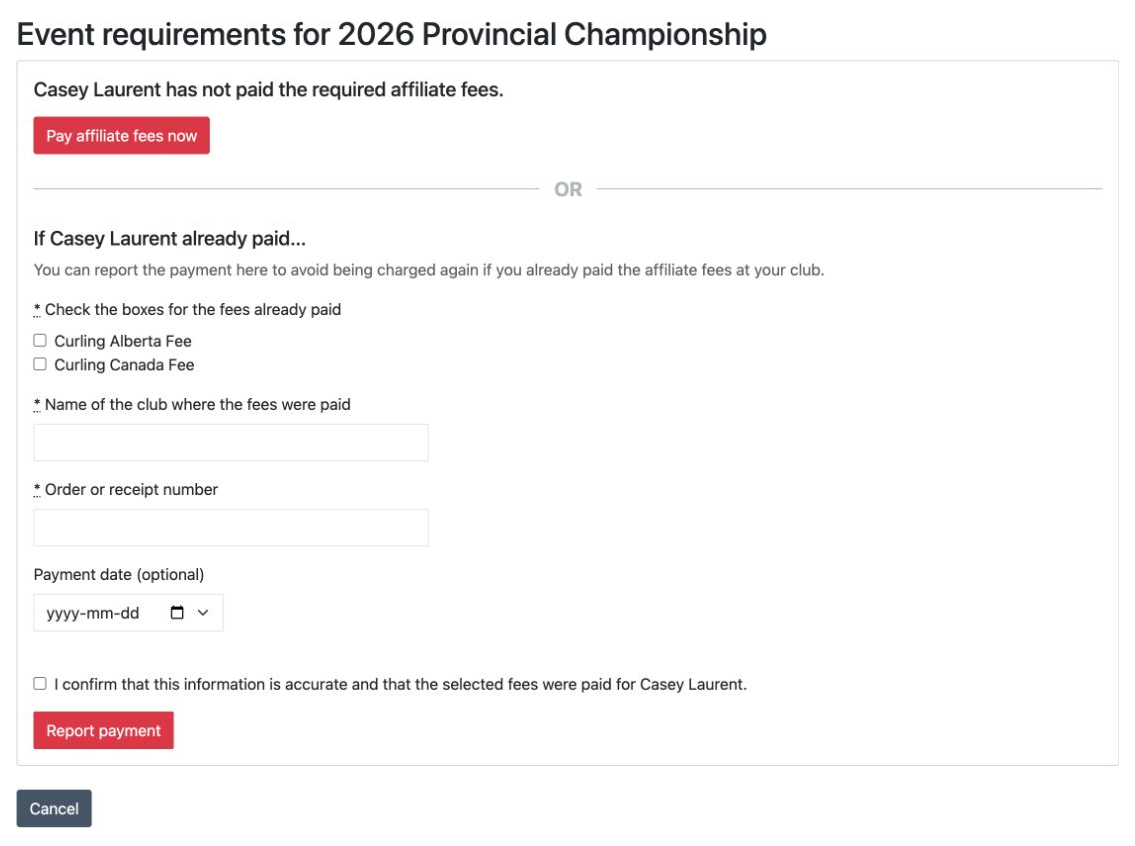
The curler must select the fees that were paid, enter the club name and an order or receipt number, and confirm the statement. The payment date is optional.
The report immediately prevents the same fees from being charged again. No staff approval is required. An administrator can reject the claim later though.
How Curling IO recognizes a paid fee
A fee counts as paid when Curling IO finds a paid, non-refunded fee item for the same:
- Curler profile
- Fee
- Competition season start year
The original order can belong to any Curling IO club. This matters when a curler paid your affiliate fee while registering at a member club.
Review requirements for an event
Open the competition in the admin area and select Profiles. The Requirements button appears beside Add curlers when you have an active waiver or affiliate fee requirement.
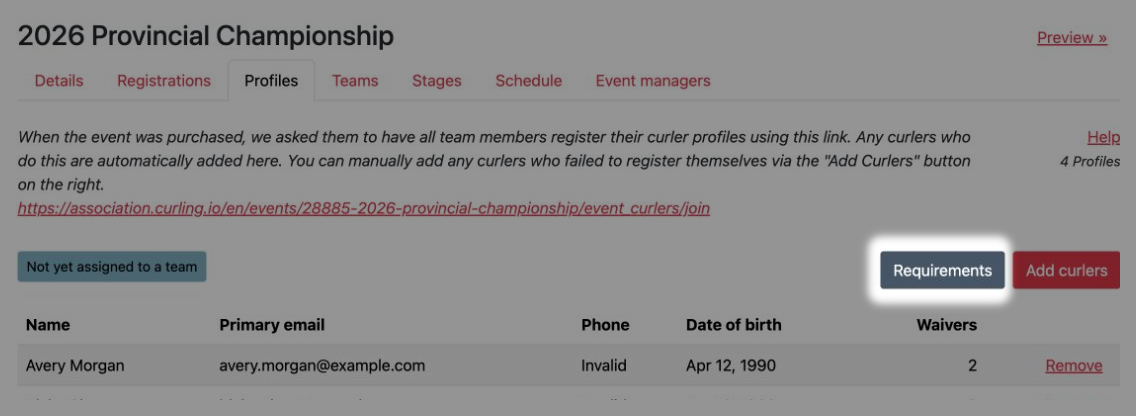
Select Requirements to see only curlers who still have something outstanding. A completed curler is left off this list.
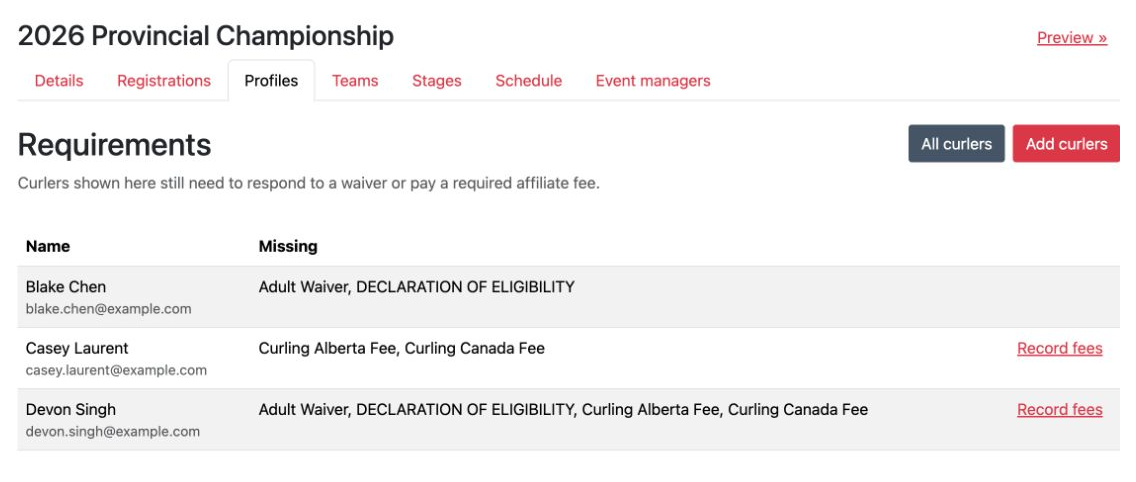
The Missing column lists each outstanding waiver or affiliate fee.
Record an external payment
Select Record fees when you have confirmed that the curler paid elsewhere. Choose the paid fees, enter the club and external order or receipt number, and optionally add the payment date and a review note. An administrator-recorded claim counts immediately.
Manage payment claims when needed
Staff do not need to approve or routinely review payments reported by curlers. Go to Club > Affiliate fee claims only when you need to reject a claim, inspect an exception, or reconcile an external report.
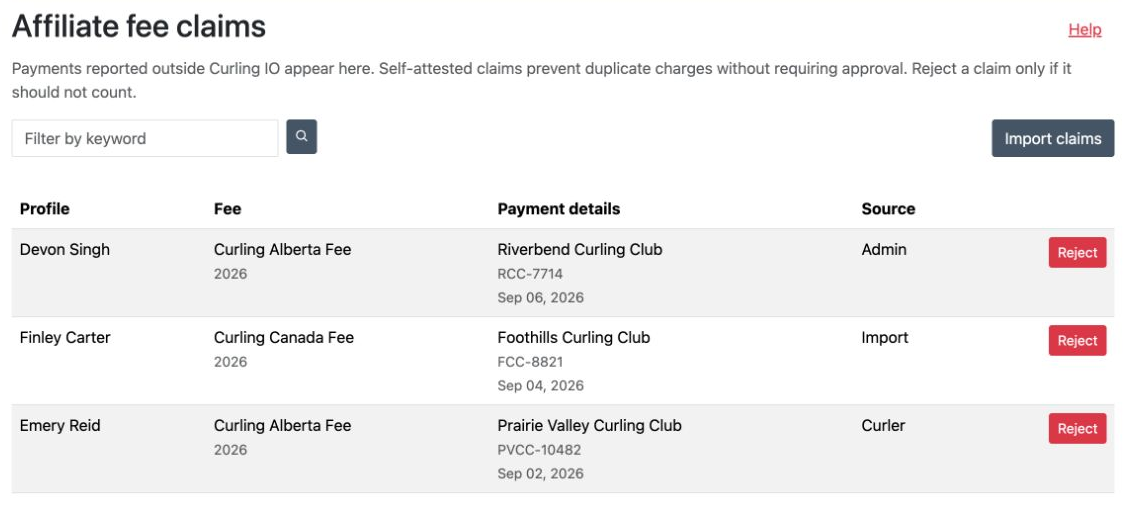
- Use the search field to find a claim by curler, fee, season, payment details, source, or claim state.
- Select Import claims to upload external payment records from clubs or another system.
- The Source column shows whether a claim came from a Curler, Admin, or Import.
- Claims from every source count immediately. Select Reject if a claim should no longer count. Curling IO asks for confirmation before rejecting it.
- If Curling IO later finds a paid fee item for the same curler, fee, and season, it links the claim to that order for reconciliation. The claim is retained as part of the record.
Import external payments
Use Club > Affiliate fee claims > Import affiliate fee claims when you have a payment report from clubs or another system. Add one row for each fee. If the same payment covered more than one fee, repeat the curler on another row with the other fee.
The upload must be a comma-separated UTF-8 .csv file, no larger than 5 MB and with no more than 10,000 data rows. Renaming a spreadsheet, PDF, or another file type to .csv does not convert it and the import will reject it.
Use the column names below exactly. You can put them in any order, but you cannot add or duplicate columns. Paid on is the only column you can omit. Every data row must line up with the header row, so remove trailing commas and extra values.
Name, required. For example,Alex Morgan.Email, required. For example,alex.morgan@example.com.Date of birth, required. UseYYYY-MM-DD, for example,1990-04-12.Fee, required. Enter the fee name exactly as it appears in Curling IO, for example,Association affiliate fee.Year season started, required. Enter the four-digit year, for example,2026.Order ref, required. Enter the order or receipt reference from the club or other system, for example,CLUB-10482.Paid on, optional. UseYYYY-MM-DD, for example,2026-09-02.
The importer validates the whole file before it commits any claims. Invalid encoding, malformed CSV, missing or duplicate headers, unknown columns, and header-only files stop the entire import. No claims from that upload are created.
Once the file structure is valid, each unambiguous row creates a claim that counts immediately. Valid rows are still imported when another row contains a missing value, invalid date, unmatched curler or fee, extra value, or duplicate. Every row that was not imported remains in the results with specific errors, so you can correct it and try another import.
When the Requirements button does not appear
The button is hidden when neither type of requirement applies. Check these points if you expected to see it:
- You have at least one active waiver, or competition affiliate fee collection is enabled with a qualifying fee.
- The fee is active, inherited, requires a curler profile, and is seasonal per curler.
- The competition belongs to you, not one of your member clubs.
- The curler is within any age limits on the waiver or fee.
If a paid or claimed fee does not appear as complete, confirm that the curler profile, fee, and season start year match. Submitted or partially paid orders remain pending until payment is complete.